Premiere Pro 2026 (version 26, first released in January 2026) installs on an 8 GB Windows 11 machine with a 4 GB GPU, and Adobe rates that minimum for real HD editing. Comfortable 4K is a different bill. 32 GB of RAM, 8 GB of GPU memory and a fast SSD for the cache. Every version 26 number on this page comes from Adobe's official requirements, last updated September 2026 for versions 26.0 through 26.5.1 (checked October 2026).
Adobe Premiere Pro system requirements for Windows
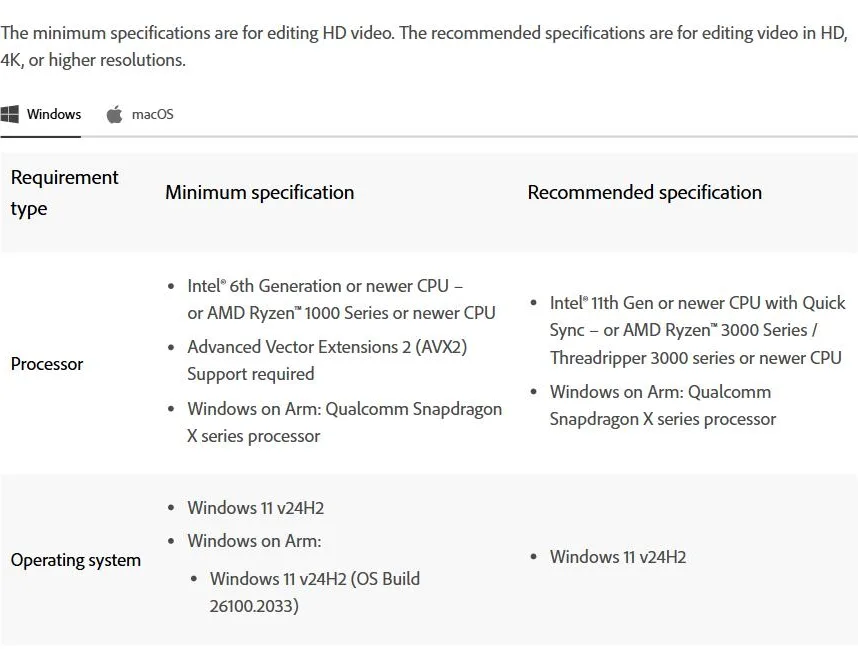
The Windows minimum is an Intel 6th gen or AMD Ryzen 1000 CPU with AVX2 support, 8 GB of RAM, a 4 GB GPU and Windows 11 v24H2.
| Requirement | Minimum (HD editing) | Recommended (HD and 4K+) |
|---|---|---|
| Processor | Intel 6th gen or AMD Ryzen 1000 series or newer, AVX2 required | Intel 11th gen with Quick Sync, or AMD Ryzen 3000 / Threadripper 3000 or newer |
| Operating system | Windows 11 v24H2 | Windows 11 v24H2 |
| RAM | 8 GB (16 GB on Arm) | 16 GB for HD, 32 GB or more for 4K |
| GPU | 4 GB of GPU memory (NVIDIA Maxwell 2014 or newer, Intel or AMD) | 8 GB of GPU memory |
| Storage | 8 GB free for the install, plus a drive for media | Fast internal SSD for app and cache, separate high-speed media drive |
| Display | 1920x1080 | 1920x1080 or more, DisplayHDR 1000 for HDR work |
| Sound card | ASIO compatible or Microsoft WDM | ASIO compatible or Microsoft WDM |
| Network storage | 1 Gigabit Ethernet (HD only) | 10 Gigabit Ethernet for shared 4K workflows |
Three of those lines retire more machines than the rest combined. Windows 10 is off the list. Version 26 asks for Windows 11 v24H2, and Adobe's version 26.3 notes say Windows 10 support will be removed in a future release. The AVX2 requirement quietly rules out older CPUs, however much RAM you've bolted on since. And Premiere refuses to install on removable flash storage, so the USB-stick workaround is out too. Windows on Arm is real now, but only on Snapdragon X processors, and Adobe doubles the memory floor to 16 GB there.
One naming note so the table doesn't confuse. Adobe's requirements page now titles the app plain Adobe Premiere. Its 25.x and 24.x pages drop the Pro too, so Premiere 2026 and Premiere Pro 26 are one and the same app. Same editor, and this page sticks with the name most editors still use.
Premiere Pro system requirements for Mac
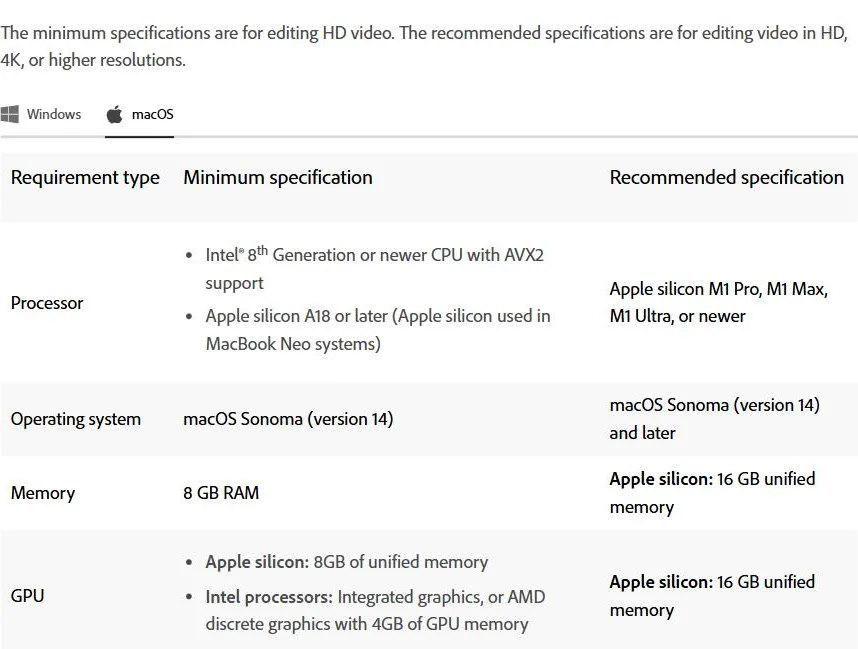
The Mac minimum is macOS Sonoma on an Intel 8th gen or Apple silicon machine, and the recommended spec is an M1 Pro or newer with 16 GB of unified memory.
| Requirement | Minimum (HD editing) | Recommended (HD and 4K+) |
|---|---|---|
| Processor | Intel 8th gen or newer with AVX2, or Apple silicon A18 or later | Apple silicon M1 Pro, M1 Max, M1 Ultra or newer |
| Operating system | macOS Sonoma (version 14) | macOS Sonoma (version 14) and later |
| RAM | 8 GB | Apple silicon: 16 GB unified memory |
| GPU | Apple silicon: 8 GB unified memory. Intel: integrated graphics or AMD discrete with 4 GB | Apple silicon: 16 GB unified memory |
| Storage | 8 GB free for the install, plus a drive for media | Fast internal SSD for app and cache, separate high-speed media drive |
| Display | 1920x1080 | 1920x1080 or more, DisplayHDR 1000 for HDR work |
| Network storage | 1 Gigabit Ethernet (HD only) | 10 Gigabit Ethernet for shared 4K workflows |
Unified memory does double duty on Apple silicon. RAM and GPU memory are the same pool, which is why one 16 GB line covers both recommended rows. Two details stand out in Adobe's table. The Intel floor sits higher than on Windows, 8th gen against 6th, and the Apple silicon line starts at A18, which per Adobe's own page covers the chips in MacBook Neo systems, not just the M series. Storage, display and network match the Windows column. Fast SSD for the app and cache, a separate drive for the media.
The same tables apply to a laptop. Adobe's page has no separate laptop column, so check the CPU generation, RAM and GPU memory of the exact model.
Premiere Pro 25 vs 26 system requirements: what changed
Version 26 raised floors that version 25 still allowed. Windows 10, macOS Ventura, 2 GB graphics cards and older Intel Macs all fell off the list.
| Requirement | Version 25 | Version 26 |
|---|---|---|
| Windows | Windows 10 (64-bit) v22H2 or Windows 11 | Windows 11 v24H2 |
| macOS | macOS Ventura (version 13) | macOS Sonoma (version 14) |
| Minimum GPU memory (Windows) | 2 GB | 4 GB |
| Mac Intel processor | Intel 6th gen or newer | Intel 8th gen or newer |
Storage, the 8 GB RAM floor and the recommended processor, RAM and GPU memory stayed the same. Windows on Arm is the exception, now listed with Snapdragon X processors and a 16 GB RAM floor. If your PC can't leave Windows 10, the 25.x line is the newest whose requirements still list it, and Adobe kept patching its 25.6 long-term-support release in June 2026 with version 25.6.6. Adobe's 24.x requirements cover versions 24.0 through 24.6, for anyone on an even older release.
Premiere Pro recommended specs: what actually matters
The Premiere Pro recommended specs buy smoothness, not permission. 32 GB of RAM, 8 GB of GPU memory and a dedicated media drive are what keep a 4K timeline responsive.
Upgrade in that order, too. RAM is the cheapest fix and the first wall you hit. 16 GB handles HD, but stack a few 4K streams and some effects and 32 GB is what stops the paging. GPU memory comes second. The minimum 4 GB card runs the app, and the recommended 8 GB is what playback and export actually lean on. Adobe's pick of an Intel 11th gen chip with Quick Sync isn't arbitrary either, that's the hardware decoder Premiere uses to chew through H.264 and HEVC without cooking a core. Then storage. The app and its media cache want a fast internal SSD, and your footage wants its own high-speed drive, because one disk doing both jobs is how scrubbing turns into a slideshow. Plugins stack their own GPU and CPU load on top of all of it, so budget headroom if your timeline leans on them.
A panel is the cheap kind of add-on, for what it's worth. SilentCut for Premiere Pro runs Silence Remover and Speech Cleanup as a panel inside the editor, so a machine that meets the specs above already runs the cleanup pass that hands your evenings back.