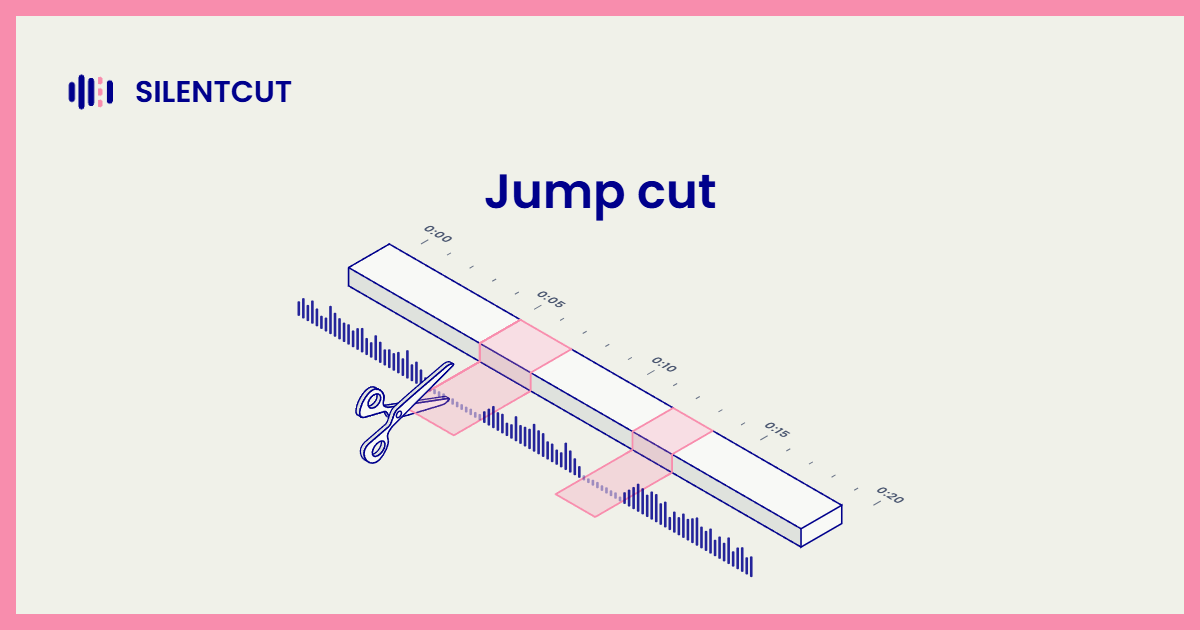
A jump cut is a cut between two shots of the same subject and framing, which makes the subject appear to jump in time. That's the jump cut definition in one line, and you already know the feeling. A YouTuber mid-sentence, a blink of discontinuity, and they're two words further along with the pause gone. What used to be a film-school mistake is now the default grammar of talking-head video, and the diagram below is the whole mechanism.
Remove a chunk from the middle of one continuous shot and butt the remaining pieces together. Same framing on both sides of the seam, so the change reads as a jump rather than a scene change. That's every jump cut ever made.
What is a jump cut, in practice
In practice a jump cut is how editors delete time without hiding that they deleted it. The classic uses split into two families. Jump cuts in film began as rebellion, most famously in Jean-Luc Godard's Breathless, where the jumps broke continuity on purpose and made the editing visible. Jump cut editing on the internet is the opposite instinct, pure efficiency. Every pause, filler word and false start gets cut, the framing never changes, and a two-minute take becomes seventy tight seconds. One jump cut example says it all: count the invisible seams in any talking-head video you watched today. Each one is a pause that used to exist.
Are jump cuts bad editing
No, but they're honest editing, and that's the real jump cut meaning today. A jump cut announces that time was removed. When the content is a person talking to camera, viewers not only accept that, they expect it, because the alternative is watching the pauses. Where jump cuts still read as mistakes is narrative work, where continuity matters and a jump breaks the spell. The craft question isn't whether to use them, it's whether your format is one where the seams are welcome. If it is, the editor's job becomes making hundreds of them fast, and b-roll exists partly to paper over the ones you'd rather hide.
How editors make jump cuts fast
Talking-head jump cuts are the most automatable edit in the craft, because the cut points are simply where the speech stops. That's exactly what Silence Remover does. It finds the dead air, cuts it, and butts the keepers together, which is to say it produces the jump cuts for you, with the sensitivity and minimum gap under your control. Your Dead Air Ratio tells you how much jumping there is to do before you start. That's the cleanup half of SilentCut, in the browser or inside Premiere Pro and DaVinci Resolve, and the hours it saves are the hours this whole technique exists to save.