The best Descript alternative is the tool that does the job you actually hired Descript for. For most editors that job was never the editing. It was the cleanup pass. Silence out, filler words out, the good take found, fast. That's the exact problem SilentCut is built to own. Most lists of Descript competitors hand you seven general-purpose editors and let you work out which menu buries the feature you need. This page compares the two tools that disagree about what you need in the first place.
Here's the short version before the detail.
| Descript | SilentCut | |
|---|---|---|
| Built for | People new to editing, by its own account | The editor's cleanup pass |
| Editing model | Edit everything by transcript | Cut silence, fillers and retakes, then hand off |
| Your timeline | XML export, repaired by hand in the NLE | The cut lands on your Premiere Pro or Resolve timeline |
| Pricing | Media minutes plus metered AI credits | Plans with AI hours included |
Why editors are leaving Descript in 2026
Two things push editors off Descript. The bill, and the trust.
The bill jumped without the workflow changing
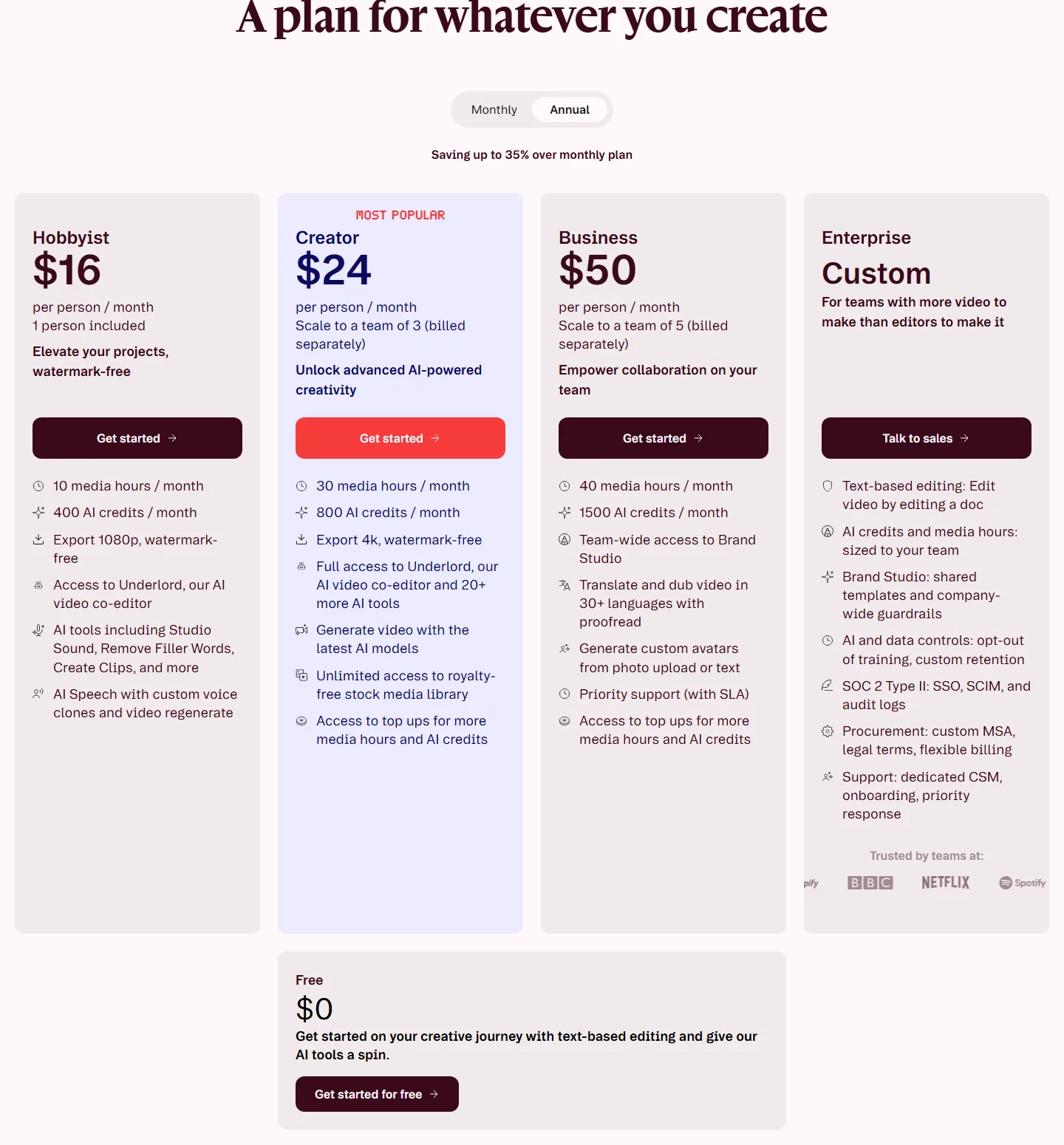
In September 2025 Descript swapped its transcription-hours model for "media minutes" plus a pool of metered AI credits. Every upload counts against the quota, multi-track sessions burn it faster, and long-time users report bills going from around $30 to close to $200 a month. Same channel, same episodes, new invoice.
The trust went with the pro workflows
Spend an hour in r/editors and the pattern is consistent. Multicam, format support and handing a cut to a real NLE are where Descript strains, and the interface reshuffles often enough that one editor summed the whole thing up as a constant live beta. Descript's own team calls those trade-offs intentional. The tool is for people who've never touched an editor. Fair. But if you edit for a living, you were never the customer.
What your workflow actually needs from a Descript alternative
An edit is two different jobs, and Descript only ever sped up one of them. The cleanup pass strips what shouldn't be there. Dead air, filler words, false starts, the three takes you didn't keep. The creative pass is everything after. Story, pacing, color, sound, graphics. General-purpose editors sell you the second job. Descript's whole appeal was doing the first one fast.
You can see what that first job is worth by watching what editors put up with to keep it. In those same r/editors threads, working editors describe running just the cleanup in Descript, then rebuilding the cut by hand in Premiere afterwards. And calling the time saved worth the headache. Read that again. The cleanup pass is valuable enough that professionals tolerate a clumsy round-trip to get it.
So the checklist for a real alternative to Descript is short. Keep the cleanup speed. Lose the round-trip. Keep the editor you already finish in.
Descript vs SilentCut: general-purpose vs purpose-built
SilentCut (silentcut.ai) is built for exactly that checklist. The cleanup pass, without the round-trip. Three capabilities define it. Silence Remover finds and cuts the dead air, with the sensitivity and minimum gap length under your control. Speech Cleanup goes after what a silence pass can't hear. Filler words, stutters, false starts, sentences you abandoned halfway. Best-Take Selector lines up every version of the line you said four times so you compare the takes and keep one.
The number underneath all of it is your Dead Air Ratio (DAR), the percentage of a video's runtime that is silence. Once you've seen that number on your own footage, the cleanup pass stops being invisible work you absorb and starts being a metric you cut down.
And the round-trip is solved by design, not patched after. SilentCut Studio runs the workflow in the browser, while SilentCut for Premiere Pro and SilentCut for DaVinci Resolve are panels inside the two editors those r/editors threads keep round-tripping into. The rough pass lands on the timeline you finish on, not in an XML you repair.
It's the tool to try if the cleanup pass is what actually eats your week.
Should you switch from Descript to SilentCut
Match the decision to the pass of your edit that actually eats your week.
- The cleanup pass is the problem. Switch. SilentCut is built for exactly that job, and Descript's own team says their tool is for people who've never touched an editor.
- You finish in Premiere Pro or DaVinci Resolve. SilentCut's panels run the cleanup on your own timeline. No XML, no round-trip, no rebuild.
- You're not an editor and you make short talking-head clips. Stay on Descript, honestly. For that job it's still one of the fastest routes to a clean cut, and none of its pro-workflow gaps will ever touch you.
One pattern worth noticing. A general-purpose editor treats the cleanup pass as a feature on a menu. Deciding which pass of your edit actually eats your week, the cleanup pass or the creative one, tells you whether a general-purpose editor fixes your problem or just relocates it.