Descript pricing runs from free to $50 per person per month across four plans, plus a custom Enterprise tier. The number that actually decides your bill isn't the plan price, though. It's the metering. Since September 2025 every plan counts "media hours" against your uploads and "AI credits" against the AI features, and heavy users pay through those meters, not the sticker. Every figure below comes from descript.com/pricing, checked September 2026, and this page gets re-verified whenever Descript's numbers move.
Descript pricing plans in 2026
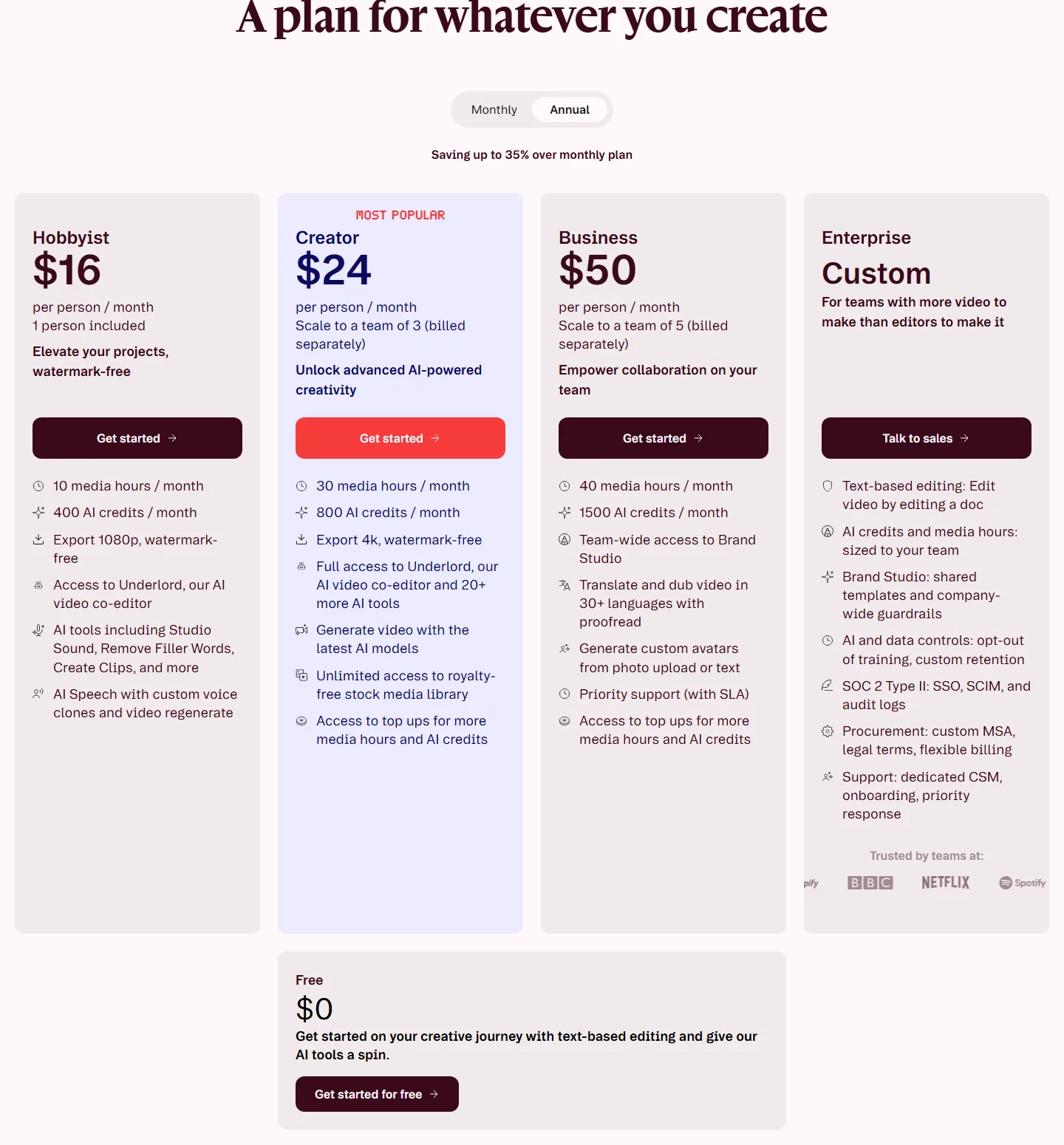
Four plans, priced per person per month, with annual billing running roughly a third cheaper than monthly.
| Plan | Billed annually | Billed monthly | Media hours | AI credits |
|---|---|---|---|---|
| Free | $0 | $0 | 1 hour / month | 100, one-time |
| Hobbyist | $16 / mo | $24 / mo | 10 hours / month | 400 / month |
| Creator | $24 / mo | $35 / mo | 30 hours / month | 800 / month |
| Business | $50 / mo | $65 / mo | 40 hours / month | 1,500 / month |
| Enterprise | Custom | Custom | Sized to the team | Sized to the team |
The plan lines are what you'd expect. Hobbyist exports 1080p without a watermark. Creator is the popular one, with 4K export, video generation, the stock library, and the full version of Underlord, Descript's AI co-editor. Business adds Brand Studio for teams, translation and dubbing in 30+ languages, and priority support. Creator and Business can also buy top-ups when the included hours and credits run out, and both scale to small teams billed per seat.
Is Descript worth it in 2026
For a solo creator making short talking-head content inside the included hours, yes, honestly. Text-based editing is still a great idea, the Free plan is a real tier rather than a demo, and $16 a month on annual Hobbyist is fair for what it does. The calculation flips when you edit in volume. Then you're not buying an editor, you're renting two meters, and the tools built for volume work start looking better per dollar.
If the meter is why you're reading a pricing page, two directions. The full Descript alternatives breakdown covers the switch options honestly. And if what you actually need is the cleanup pass, the silence, fillers and retakes that likely drew you to Descript, that's the one job SilentCut is built around, priced as a plan with AI hours included rather than metered uploads.
How media hours and AI credits actually work
The meters are the whole pricing model, so it's worth being precise. Media hours count the footage you bring in. Upload against the quota, and when the month's hours are gone, so is your headroom. AI credits are a second pool that AI features draw from, filler-word removal and clip generation included. Two meters, refilled monthly, sized by plan.
Here's what that means in practice. A podcaster cutting one weekly show from a single track sits comfortably inside Creator. Anyone working multi-track, long-form or in volume burns through hours faster than the plan names suggest, and users have posted about bills that jumped several times over after the 2025 switch, without their workflow changing. Descript's answer to that is top-ups. Whether that answer feels fair depends on which side of the meter your workflow lands.
How to cancel Descript subscription plans
The Descript cancel subscription flow lives in your account's subscription settings in the web app, and the sensible first step is checking which billing you're on. Monthly plans stop at the end of the cycle. Annual plans are the ones to watch, since the discount bought a year-long term, so check your renewal date before assuming anything ends early. If your reason for cancelling is the meter rather than the tool, downgrading to Free keeps your account and an hour a month while you decide.