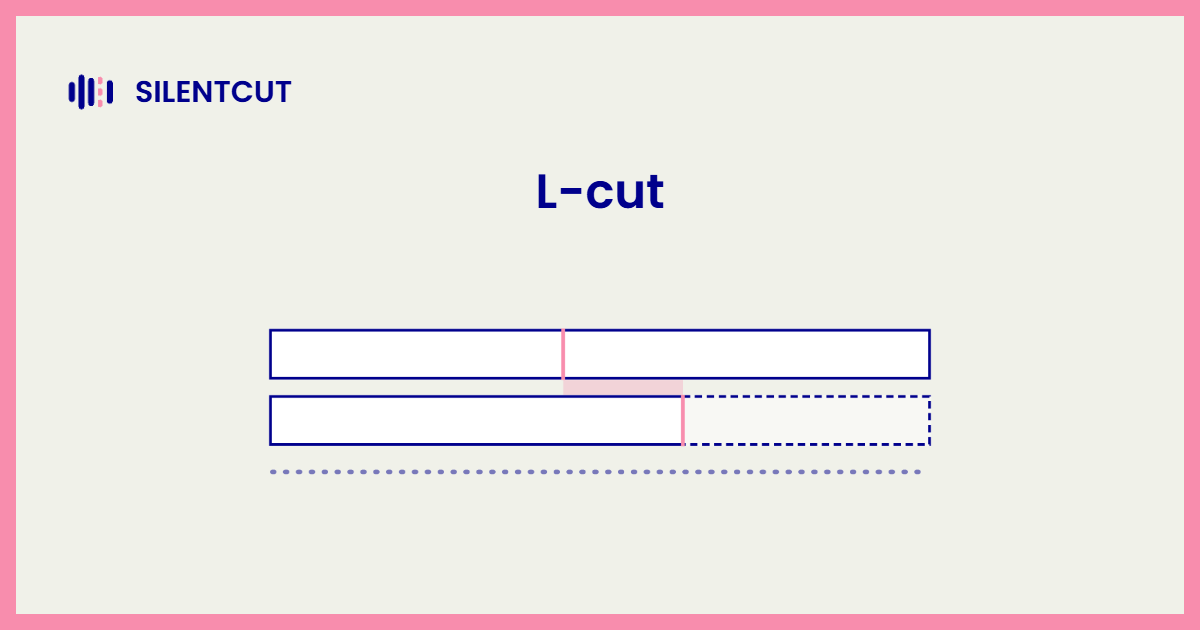
An L-cut is an edit where the outgoing shot's audio continues under the next shot's video, so you keep hearing a scene after you've stopped seeing it. On a timeline with video above audio, the trailing audio draws an L. The diagram says it faster.
What an L-cut does
An L-cut lets a moment linger. The speaker keeps talking while you watch the listener react, which is the single most common use in any interview or drama, because the reaction is often the story. It also smooths exits. A scene's sound decaying under the next scene's picture leaves gracefully instead of being switched off. Reaction shots, breathing room, gentle handoffs. That's the L-cut's whole portfolio, and it's enough to appear in nearly every professionally cut conversation.
L-cut vs J-cut
Mirror twins. The L-cut trails the old audio under the new picture; the J-cut leads the new audio under the old picture. L remembers, J anticipates. Editors braid both through a conversation so the sound flows continuously while the pictures trade, and the fastest upgrade to an amateur edit is exactly that braid. The J-cut page covers the other half of it.
When to reach for an L-cut
Any time the reaction matters more than the speaker, which in interviews is constantly. Any time a scene should exhale rather than stop. And in talking-head work, after the cleanup pass has tightened the timeline, a few frames of L-cut soften the joins that remain. The tightening itself, the silence, fillers and dead takes, is the pass SilentCut automates before your finesse begins, on the same Premiere Pro and DaVinci Resolve timelines. Rough pass automated, L-cuts yours.