CapCut pricing splits into a free plan, Standard at $9.99 a month, and CapCut Pro at $19.99 a month or $179.99 a year. Those are the US figures from CapCut's own help pages and app listings, checked September 2026, and CapCut itself notes that what you actually pay varies by region, platform and promotions. The question that decides most people's bill isn't free versus paid, though. It's whether you need Pro at all, because Standard exists precisely for the people who don't.
CapCut pricing plans in 2026
Three tiers for individuals, plus a per-seat Teams plan priced at checkout. This is the whole CapCut price list as their own pages state it.
| Plan | Price | Who it fits |
|---|---|---|
| Free | $0 | Casual edits, watermark and feature limits |
| Standard | $9.99 / month | Regular creators who want the core paid features |
| CapCut Pro | $19.99 / month or $179.99 / year | The full AI toolkit and premium assets |
| Teams | Per seat, priced at checkout | Shared projects and team workflows |
That table is the whole CapCut Pro price story, and the CapCut Pro subscription price only drops one way. The yearly plan works out to about $15 a month, the obvious pick if you already know you'll still be using CapCut next spring. Everyone else, keep reading.
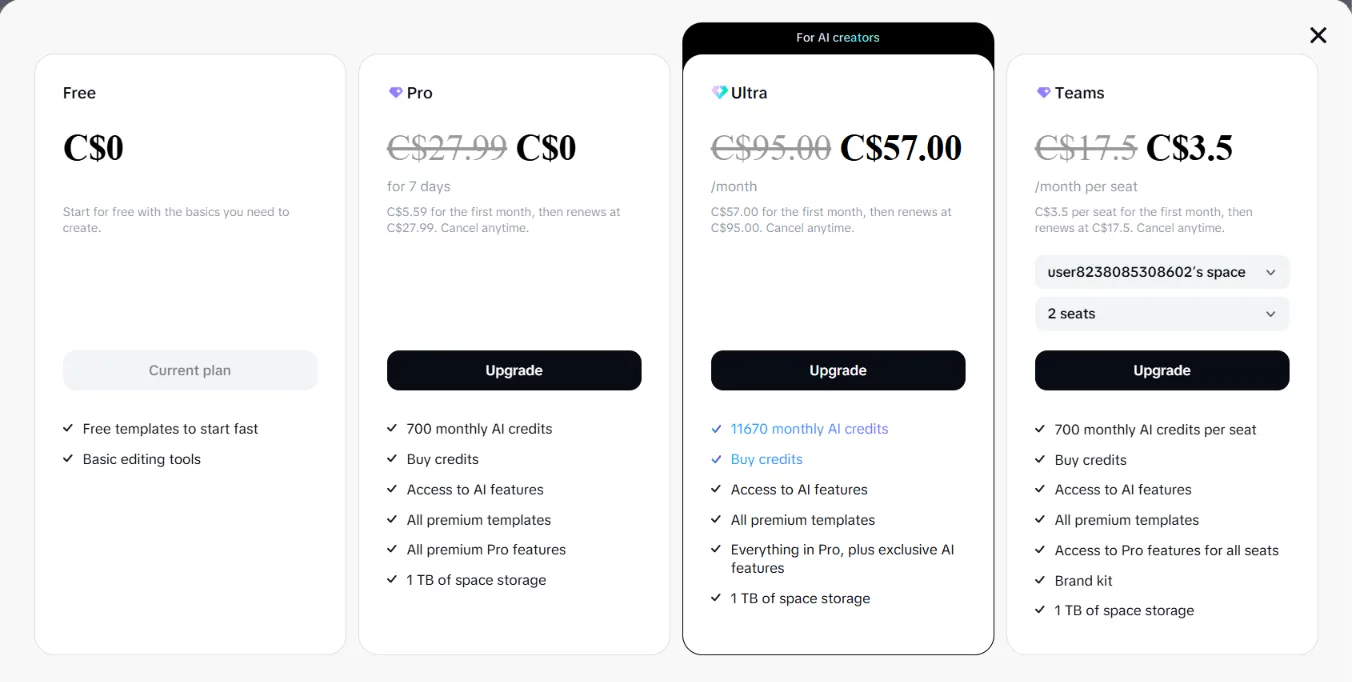
One live checkout, two lessons. The prices land in your own currency, that screen shows C$27.99 for the Pro our table lists at $19.99 US, exactly the regional variation CapCut warns about. And some checkouts now show an Ultra tier above Pro, an AI-credits-heavy plan pitched at AI creators. CapCut's main subscription pages don't publish a global Ultra price yet, so treat whatever your checkout shows as the number. If Ultra appears in your app, it's a new top of the ladder, not a replacement for anything in the table.
Is CapCut Pro worth it in 2026
For social-first creators, honestly, yes. Nothing at $9.99 or even $19.99 gives you more editing per dollar, the captions are genuinely strong, and the free tier still exists to prove you need more before paying. Two eyes-open caveats. CapCut projects don't export to other editors, so the subscription also buys lock-in. And if the thing eating your week is the cleanup pass, the silence, filler words and retakes before the fun part, that's not what CapCut is built around. That job is what SilentCut exists for, on the timelines editors actually finish on. If you're paying for Pro to make cleanup faster, you're paying the wrong meter.
If the bill still doesn't sit right after the Standard check below, the CapCut alternatives breakdown covers the honest ways out.
CapCut Standard vs Pro: don't overpay
Most people staring at CapCut Pro pricing actually need Standard. Standard carries the core paid experience at half the price, and the CapCut Pro features that justify the higher tier are the AI-heavy ones plus the premium asset library. CapCut's own comparison page draws the line the same way. If your editing is cuts, captions, transitions and posting to social, Standard covers your week. If you lean on the advanced AI tools daily, generation-heavy workflows, the premium stock, that's what the extra ten dollars a month is buying.
The lineup arrived with a restructure that longtime users widely described as a price hike, so if the number looks higher than you remember, it is. That history matters for one practical reason. The tier that matches the old price point is Standard, not Pro, and defaulting to Pro out of habit is the easiest way to pay double for features you won't open.
The CapCut Pro free trial, and how to pay less
CapCut Pro has a 7-day free trial, with two rules from CapCut's own help pages. It's available in select countries and regions, and only for accounts that have never subscribed to Pro before. There's no broader CapCut free trial beyond it, since the free plan is that. One trial per account, ever, so spend it on a week when you're actually editing.
Three legitimate ways to keep your CapCut costs down. Take the yearly plan only once Pro has survived a real month of your workflow, since $179.99 up front is a commitment to a tool you might outgrow. Check whether Standard covers you before renewing Pro. And CapCut runs a referral program that grants free Pro time for invited friends, up to seventy days of it, which is the rare vendor promo that's actually worth the spam.